Scan · Measure · Match · Shoot

KNOW BEFORE
YOU SHOOT.

Scan your set. Measure your light. Find problems before you roll.

Why

YOUR SET IS TALKING.
ONSET LISTENS.

Every light on set has a frequency, a brightness, a colour and a flicker behaviour. OnSet Assist reads all four and tells you what they mean for your camera.

Frequency

Mains-powered LEDs pulse 100 or 120 times a second. Your eye averages it. Your sensor does not.

Brightness

Lux on the face, the background, the hair light. Ratios decide the look.

3200K5600K

Colour

Kelvin and green–magenta tint. Mixed sources read as two colours on camera.

Flicker

The wrong shutter turns that pulse into rolling bands across the frame.

01 · Scene Scan
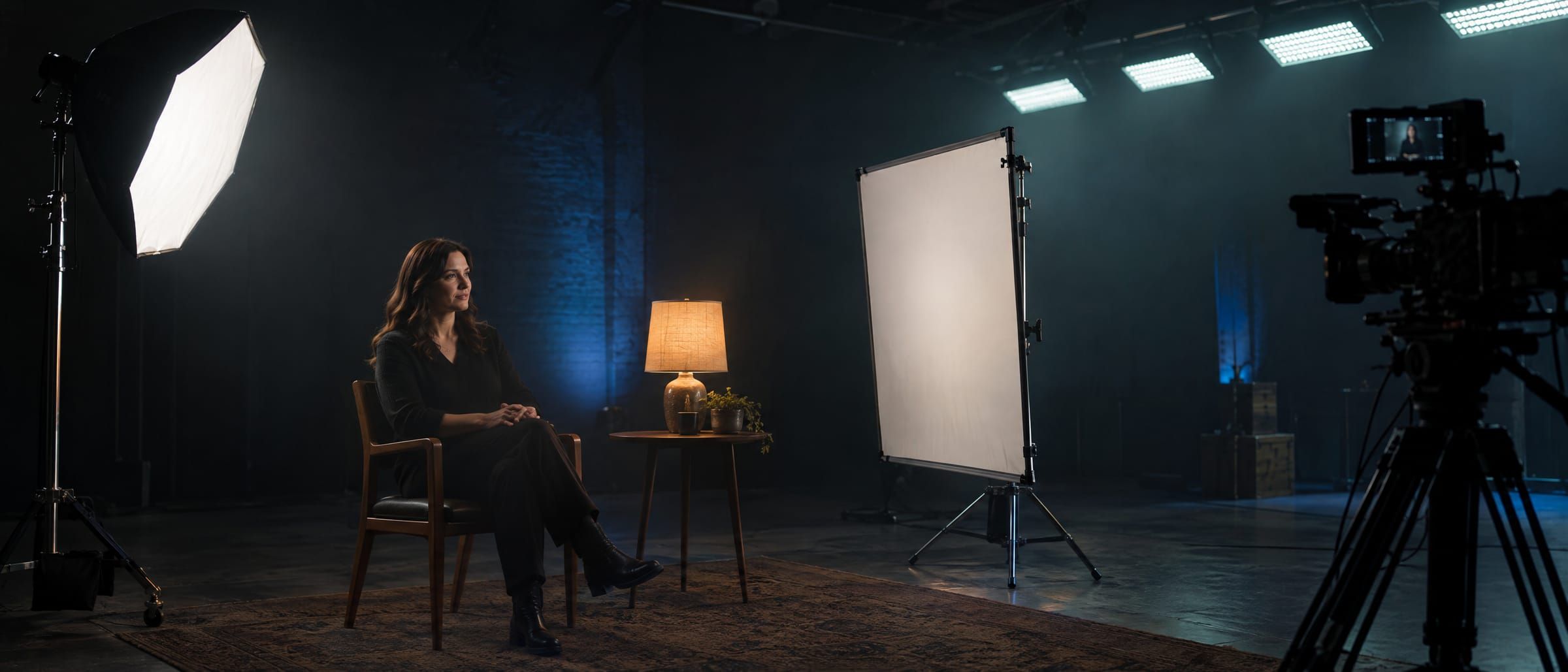
SCAN THE SET.

Raise your phone and move it slowly across the set. OnSet Assist tags every light source: its level, its colour, and whether it will flicker on your camera.
SIMULATED DEMO · NOT A LIVE MEASUREMENT
Interview set with a softbox key, table lamp, bounce fill and LED ceiling panels

Move over the set and hold on each light source. On a phone, tap them.

02 · Flicker

FLICKER YOU CAN'T SEE.
PROBLEMS YOUR CAMERA CAN.

Banding simulated for illustration

03 · Recommendations

GET THE SETTINGS.

Not a formula. A setting your camera can actually be set to. If a body only has standard shutter speeds, OnSet Assist never tells you to dial 1/53.4.
Camera
Light flicker
Frame rate

Shutter angle: not verified · Fine shutter: not verified. Unverified features are treated as unavailable.

Sony A1 II

SAFE
25

FPS

1/60

Shutter

150°

Angle

  • · Ceiling LED flickers at 120 Hz.
  • · 1/60 spans exactly 2 flicker cycles, so every sensor row sees the same light.
  • · This is the closest flicker-safe setting to 180°.
  • · Dial it in as a shutter speed, the way this camera works.

04 · Meters

MEASURE EVERYTHING THAT MATTERS.

Light meter, colour meter, spot meter and lighting ratios, calibrated against your own reference meter if you have one, and always labelled as estimates.

Key

850 lux

Fill

265 lux

1.7 STOPS · 3.2 : 1

Light meter and ratios · key and fill measured at the face.

Practical

3200K

Key

5600K

Recommended white balance

5600K · M+2

Let the practical stay warm.

Colour meter and mixed-light detection.

Spot meter

Face 0.0 · Window +2.7

Tap areas of the image and compare them in stops.

Exposure

F2.8 −0.2 · ND 0.9

Holds your chosen stop at ISO 800, 1/50, and finds the ND.

Calibration

Saved per phone

Match the phone to a professional meter once; the offset stays.

05 · Continuity

MATCH IT LATER.

Come back to a location three weeks later. OnSet Assist compares the room with the setup you saved, light by light, and tells you how far to move each one.
DAY 1 → DAY 21

KEY

ADJUST

Target

850 lux · 5600K

Now

720 lux · 5150K

Δ

+0.24

→ Raise about 0.25 stop, cool by ~450 K

FILL

MATCHED

Target

265 lux · 5400K

Now

262 lux · 5400K

Δ

+0.02

BACKGROUND

ADJUST

Target

70 lux · 6500K

Now

98 lux · 6500K

Δ

−0.49

→ Lower about 0.5 stop

06 · My Kit

BUILT AROUND YOUR KIT.

Add your cameras, lenses, filters and lights. Recommendations respect what each body can really do: its frame rates, shutter modes and flicker tools. Specifications are only stored when verified; anything else is marked as such.

Camera · in use

Sony A1 II

23.976 / 24 / 25 / 29.97 / 50 / 59.94 / 100 / 119.88 fps

Shutter angle · not verified → recommendations use standard speeds

Lens

Sony FE 50–150mm F2 GM

50–150mm · F2 · Sony E

07 · Set Reports

YOUR SHOOT. DOCUMENTED.

Every scan resolves into a set report: camera, lens, settings, every light reading and the flicker status. Export it as a PDF for the production, or keep it for the reshoot.
ONSET ASSIST

Set report

Project

Content Trips

Scene

Interview 01

BODY
Sony A1 II
LENS
FE 50–150mm F2 GM
FOCAL
85mm
FPS
25
SHUTTER
1/50
ANGLE
180°
ISO
800
APERTURE
F2.8

KEY

5600K · 850 lux

SAFE

FILL

5400K · 265 lux

SAFE

PRACTICAL

3200K · 95 lux · 100 Hz

MODERATE

Key / Fill

1.7 stops · 3.2 : 1

READY TO SHOOT

08 · Try the app

OPEN APP. POINT PHONE.

This is the OnSet Assist app itself, running in your browser. Start a Scene Scan, run a flicker test, open the set report or match a setup from three weeks ago.
SIMULATED DEMO · NOT A LIVE MEASUREMENT
  • · Scene Scan: drag across the set, or tap “Demo: scan for me”.
  • · Flicker Scan: try 100 Hz, 120 Hz, fast PWM or a steady source.
  • · Tools: light, colour and spot meters, scopes and calculators.
  • · Projects: a saved interview setup, its report and Match Setup.

In a browser nothing is measured. On a phone, OnSet Assist analyses the camera feed locally; nothing is uploaded unless you save it.

Everything in one app

THE TOOLKIT IN YOUR POCKET.

01

Scene Scan

Every light, one verdict

02

Flicker Scan

Frequency and safe shutters

03

Light Meter

Lux, EV, aperture, ND

04

Color Meter

Kelvin and tint

05

Spot Meter

Compare areas in stops

06

Lighting Ratios

Key, fill, back, hair

07

False Color

Exposure zones

08

Waveform

Luma by position

09

Histogram

Tonal distribution

10

My Kit

Cameras, lenses, filters

11

Match Setup

Continuity across days

12

Set Reports

PDF for the production

13

Calculators

DoF, FoV, ND, sun, frame guides

Pricing

7 DAYS FREE.

Everything included. Cancel any time during the trial and you pay nothing; you get a reminder a day before it ends.

Monthly

€5.99

per month · cancel any time

Start free for 7 days
BEST VALUE · SAVE 37%

Yearly

€44.99

per year · €3.75 a month

Start free for 7 days

Prices in euro including VAT. Subscriptions are handled by the App Store and Google Play. Launching soon on iPhone and Android.

DON'T FIND OUT
IN POST.

KNOW BEFORE YOU SHOOT.

START FREE FOR 7 DAYS